What an AI Image Editor Fixes in a Rescue Dog's Adoption Photos

Two dogs sit in the same foster program with the same temperament and roughly the same story.
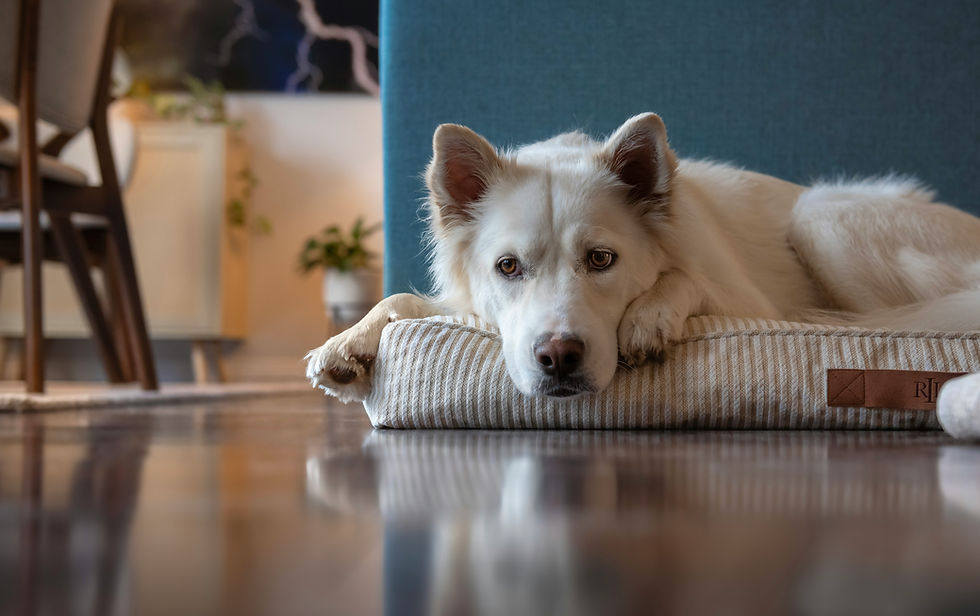
One has a photo taken through a chain link under fluorescent light, where she looks grey, frightened and slightly blurred. The other has a photo taken outside on an overcast afternoon, at her eye level, where you can see she is interested in something off to the left.
The second dog gets applications. The first dog waits.
Nothing about dogs is different. The photographs are, and for a dog in rescue that difference is measured in weeks or months of waiting.
Volunteers aren't bad at this. Photographing a frightened shelter animal with a phone during a busy day is genuinely difficult. An AI Image Editor from Higgsfield can help improve photo quality, but it should never alter the animal's actual appearance.
Why do listing photos matter so much?
Because the photo is the entire first impression, and most people never read past it.
Somebody browsing available dogs is scrolling. They stop on a face, they open that listing, and only then do they read about temperament, history and requirements. A photo that does not make somebody stop means the words underneath are never seen.
This affects some dogs far more than others:
Black dogs photograph badly under poor light and wait longer in almost every rescue
Senior dogs look tired in a bad photo and dignified in a good one
Large breeds can look intimidating depending on angle and framing
Frightened dogs photograph as either sad or sullen, neither of which is accurate
Dogs with visible conditions need photographs that show them clearly and kindly
The dogs who wait longest are frequently the dogs photographed worst, which compounds. A dog who waits gets more photos taken in a shelter environment, which produces more photos that do not work.
What goes wrong in shelter and foster photos?
A predictable list, and almost all of it is light and position.
Shot through the kennel so the bars are in front of the dog's face
Fluorescent light, which puts a green cast on everything and flattens the coat
Shot from standing, looking down, which makes any dog look small and cowed
Too far away, so the dog is a shape in a concrete space
Dog not settled, meaning you photographed the first thirty seconds rather than the fifth minute
No catchlight in the eyes, which is what makes a face look alive
That last one does more work than anything else. A small reflection in the eye is the difference between a face you connect with and a face that reads as flat.
The concrete and chain link matter too. They tell a viewer this is an institution, which triggers pity rather than interest, and pity is not what gets an application submitted.
How should a rescue dog actually be photographed?
Outside, at eye level, after the dog has settled, with somebody helping.
Get the dog out of the run or the crate first, into a yard or a quiet room
Let them settle for five or ten minutes before the camera comes out
Go outside if you can, with overcast light being ideal and bright sun being worst
Get down to their level, which means lying on the ground more often than not
Bring a second person with treats or a squeaker, positioned just behind the camera
Shoot in burst mode, because the good frame lasts a fraction of a second
Take far more than you need, since the hit rate is low with any animal
The helper matters most. A dog looking at something interesting just behind the lens produces the expression that gets adopted, and no amount of calling from behind the camera achieves it.
For a nervous dog, let them come to you and photograph them where they settle. A photo of a dog relaxed in a corner is better than a photo of a dog being held in position.
What about black and dark-coated dogs?
A real technical problem, and the reason black dogs wait longer in almost every rescue.
A camera exposing for a scene will underexpose a black dog into a featureless shape. The face disappears, the eyes disappear, and what remains is a dog-shaped absence.
What helps:
Expose for the dog rather than the surroundings, which usually means tapping on the dog on a phone
Avoid direct sun, which creates harsh contrast that dark coats handle badly
Use side light, which reveals the texture and shape a flat front light removes
Find a lighter background so the outline separates
Get the catchlight, which on a dark face is doing almost all the work
Overcast days are genuinely the best conditions for dark dogs, which is convenient because they are also the most common ones.
An AI Image Editor recovers a considerable amount from an underexposed dark dog, because the detail is frequently in the file even when the screen shows nothing. That is the single most useful correction available for this specific problem.
What can an AI Image Editor correct?
The conditions, which is almost everything that goes wrong.
AI Image Editor color cast removal, taking the green out of fluorescent-lit photos
AI Image Editor exposure recovery, which brings a dark dog back out of the shadows
AI Image Editor contrast correction, restoring the separation that flat light removes
AI Image Editor background cleanup, softening or removing kennel bars and concrete
AI Image Editor consistency across a set, so all of a foster's photos look like one dog on one day
Higgsfield runs an AI Image Editor in the browser as part of an AI creative suite, which matters for a volunteer organization where nobody is buying software and the person doing this is using whatever laptop they have.
The background point needs care and has its own section below. The color and exposure work is unambiguous and makes the largest difference.
What must never be changed?
The dog. Any part of the dog, for any reason.
Never use an AI Image Editor to remove scars, which are part of this animal's history and which the adopter will see
Never lighten or remove grey on a senior dog's muzzle
Never use an AI Image Editor to alter weight, in either direction
Never remove or correct a cloudy eye, a missing eye or a missing limb
Never change coat color or markings, which for a breed with distinctive patterning matters enormously
Never remove a muzzle if the dog wears one
The reason is practical rather than moral. An adopter who arrives expecting the dog in the photo and meets a different dog is an adopter who may not proceed, or worse, who proceeds and returns the dog a week later.
A returned dog is a far worse outcome than a dog who waits longer. The waiting is hard on everybody and the return is harder on the dog.
Show the actual animal. The people who adopt three-legged dogs and dogs with cloudy eyes exist, and they are looking for exactly that dog.
Where is the line on backgrounds?
Softer than on the dog, and still worth thinking about.
Removing kennel bars from a photo is defensible. The dog will not be living in a kennel, and the bars tell a viewer about the shelter rather than about the animal.
What is not defensible is using the background to hide something relevant. If a dog needs a secure yard, a muzzle in public, or specific handling, the photograph should not be constructed to suggest otherwise. The listing text does that work, and it has to be accurate.
A reasonable position:
Softening or cleaning a background in an AI Image Editor is presentation
Removing institutional context is acceptable since it is not about the dog
Removing anything that indicates the dog's needs is not
Adding an environment the dog has not been in crosses into misrepresentation
When in doubt, photograph somewhere better rather than reaching for an AI Image Editor. Ten minutes in a yard produces a better result than any amount of correction.
Does the breed change what you should show?
Considerably, and for high-drive working breeds it matters more than almost anywhere.
A photograph of a cattle dog lying calmly on a sofa is accurate for about an hour a day and sets an expectation the breed cannot meet. The adopter who chose that dog because they wanted a calm companion returns it within a month.
For working breeds, the photograph should match the reality:
Show the dog active, outdoors, doing something
Show the physical build, since people underestimate what they are taking on
Include an alert expression, which is honest for the breed
Avoid the sleepy sofa shot as the primary image
Browsing the available dogs for a herding breed should give somebody an accurate sense of energy level before they read a word, because the people who should adopt these dogs are the ones who see that and get excited rather than concerned.
The right adopter self-selects from an honest photograph. The wrong one self-selects from a misleading one, and that is how dogs come back.
Does video help more than photographs?
For some dogs considerably, rescues underuse it badly.
A photograph shows what a dog looks like. Thirty seconds of video shows how a dog moves, how it responds to a person, and what its energy is actually like. For high-drive breeds that distinction decides whether the right adopter recognizes the right dog.
What a short clip should capture:
Movement, since gait and energy are impossible to read from a still
Response to a person, which tells an adopter more than any temperament description
The dog settling, which reassures people worried about a working breed
Any mobility issue, shown honestly rather than cropped out
Sound off, since most people watch without audio
Keep it short. Thirty seconds does the job and nobody watches two minutes of a dog in a yard.
The same honesty rule applies absolutely. A clip edited to hide a limp, a reactivity trigger or a mobility limitation is the same misrepresentation as an altered photograph, and it produces the same return.
Higgsfield handles the framing and the tidy-up around a clip filmed on a phone, which is what makes a listing video look deliberate rather than accidental.
How do you handle a set for one dog?
As a set rather than as individual photos, which is what makes a listing look considered.
Most listings carry one good photo and three poor ones, which undermines the good one.
A workable set:
One strong portrait, eye level, with a clear expression and catchlight
One full body, showing size and build honestly
One in motion, particularly for active breeds
One with context, meaning a person or an object that gives scale
One that shows personality, which is frequently the odd one
Correct one properly in Higgsfield to settle how the dog's coat should look, then apply that across the set. A dog who appears to be three different colors across four photos confuses people.
And re-shoot into Higgsfield as the dog changes. A dog who has been in foster care for two months usually looks substantially better than on intake, and the intake photo is doing harm by then.
What would one foster dog take?
Twenty minutes with the dog and ten at a screen.
Pick an overcast afternoon or a shaded spot, avoiding bright sun
Let the dog settle before anything comes out
Get low, with a helper behind the camera
Shoot in bursts, far more than feels necessary
Pick five for Higgsfield, honestly, including one full body
Correct the color and exposure in an AI Image Editor, leaving the dog alone
Update the listing from Higgsfield and note the date so you know when to reshoot
The twenty minutes outside is the part that matters. Everything at the screen afterward is recovering what the conditions took.
Conclusion
A rescue dog's photograph is doing a job no amount of good writing underneath can rescue. People stop on a face or they keep scrolling, and the dogs photographed worst are frequently the ones already waiting longest.
An AI Image Editor recovers the color and exposure that shelter conditions take, and Higgsfield runs it in a browser for an organization that is not buying software.
The dog stays exactly as the dog is. Somebody out there is specifically looking for a grey-faced heeler with one eye, and they will only find her if you show her.